
I’ve spent the last six months walking into the same scene: a founder hunched over their laptop, showing me a website that looks fine at first glance. Clean enough. Professional photos. Maybe even a nice color scheme.
Then they click to the contact page and nothing happens.
Or they try to update a service description and realize they can’t—the developer vanished, or the platform requires code they don’t have, or the whole thing is locked behind a proprietary system they don’t control.
The conversation that follows is always some version of: “I thought I was being smart. I found someone cheap. Now I’m stuck, and I think I’m losing deals because of it.”
What’s driving me to write this now isn’t just the rescue projects. It’s the noise. YouTube comments and LinkedIn threads are full of two extremes: people insisting websites are dead (“just use Instagram!”) and others promising a $299 site that will “print money.” Meanwhile, real business owners are quietly terrified they’ll waste money on a digital lemon or get locked into something they can’t control.
What’s missing is a phased, data-driven decision path that treats your website investment like what it actually is: a measurable asset tied to ROI and risk reduction.
What You’re Actually Buying (And What You’re Not)
When someone says “I need a website,” what they usually mean is “I need something that makes me look credible and brings in business.”
Those are two different outcomes. Conflating them is where the trouble starts.
A website that looks professional is table stakes. It won’t scare people off. But it also won’t necessarily generate pipeline. I’ve seen gorgeous sites with zero lead capture, no clear calls to action, and navigation so clever that prospects give up trying to find the services page.
What you’re really buying—or should be—is a system that does three things:
- Establishes credibility (so prospects don’t bounce)
- Captures intent (so you know who’s interested)
- Converts attention into measurable business outcomes (booked calls, qualified inquiries, accelerated sales cycles)
Everything else is either supporting that or it’s decoration.
The gap between “looks fine” and “drives ROI” is where most of the regret lives. A $500 template site might look decent in screenshots, but when you try to add a lead magnet, integrate your CRM, or update your service offerings without waiting three days for a developer, you realize what you didn’t buy: control, flexibility, and the infrastructure to measure what’s working.
The Real Cost Structure (And Where Hidden Expenses Live)
Let’s talk numbers, because this is where the YouTube-style “$299 vs $5k” arguments fall apart.
The cost of creating a website isn’t just the upfront build—it’s the total cost of ownership over 12-24 months, including what you pay to fix, update, and optimize.
What I See in Rescue Projects
| Price Tier | What You Get | Hidden Costs | 6-Month Reality |
|---|---|---|---|
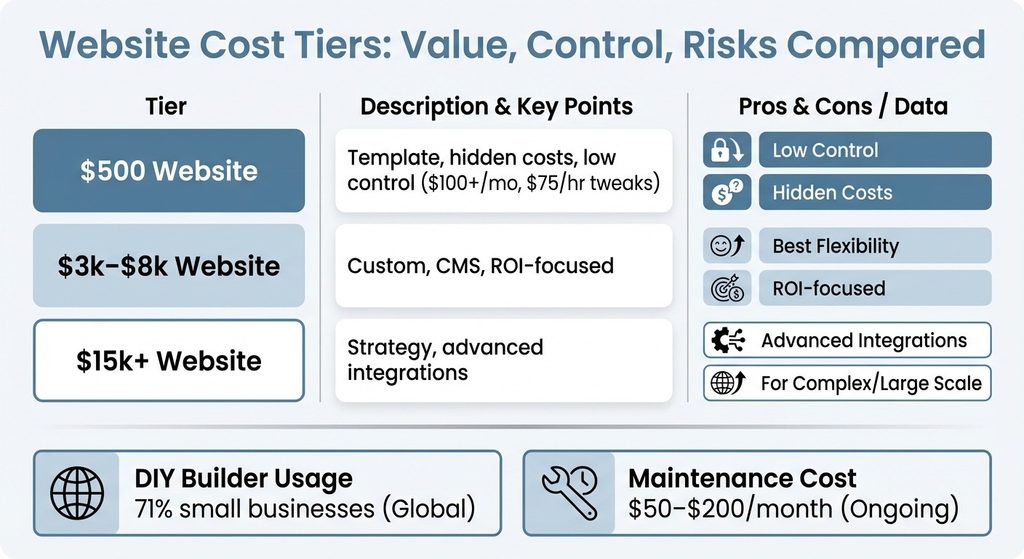
| $500 site | Template on builder platform, minimal customization, no strategy, DIY content | $100/month for features, $75/hour for tweaks, slow mobile load, zero SEO | $1,200+ spent, still doesn’t work |
| $3k-$8k range | Custom design, usable CMS, basic SEO, mobile optimization, SSL/security | Depends on whether agency thinks about outcomes vs deliverables | Control and foundation to build on |
| $15k+ tier | Strategic discovery, UX research, advanced integrations, phased roadmap | Overkill if validating product-market fit | Makes sense when scaling complex offerings |
A $5k site with a CMS you control, SEO basics in place, and clear conversion tracking is a better investment than a $15k site you can’t update without calling the agency every time.
Where the Money Actually Goes
When you’re evaluating a quote, here’s what you’re paying for:
Strategy and discovery (10-20% of cost): Understanding your audience, mapping conversion paths, defining what success looks like. If the proposal skips this, you’re buying execution without direction.
Design and UX (25-35%): Not just “make it pretty,” but structuring information so prospects find what they need, trust signals are visible, and calls to action are clear. Good UX in B2B means a prospect can figure out if you’re a fit in under 90 seconds.
Development and CMS setup (30-40%): The actual build, including a content management system that lets you update pages, add blog posts, and manage content without a developer. The key question: can you make changes yourself, or are you dependent?
SEO, security, and mobile optimization (15-25%): SSL certificates, mobile-responsive design, page speed optimization, and basic on-page SEO. These aren’t nice-to-haves. They’re the difference between a site that ranks and converts versus one that doesn’t.
Ongoing maintenance and updates: Hosting, backups, security patches, content updates. Budget $50-$200/month depending on complexity.
DIY vs Agency vs Freelancer: The Decision Tree
This is where I see the most paralysis. According to market research, around 71% of small businesses globally use website builders instead of custom development, which tells you something: for many businesses, a builder platform is enough.
But “enough” depends on what you’re trying to accomplish and what you’re capable of managing.
Go DIY (Squarespace, Wix, Webflow) if:
- You’re pre-revenue or validating an idea and need something fast
- You have time to learn the platform and create content
- Your service offering is straightforward
- You’re comfortable with the platform’s limitations on customization and integrations
The tradeoff: you save money upfront but spend time. And if you outgrow the platform, migrating later is painful.
Hire a freelance web designer/developer if:
- You need custom design or functionality beyond templates
- You want someone to handle the technical setup but don’t need ongoing strategy
- Budget is $3k-$8k and you’re comfortable managing the relationship
The tradeoff: quality varies wildly. Vet portfolios carefully, ask about CMS training, and make sure you’ll own the site and have admin access.
Engage a website development agency if:
- You need strategic guidance, not just execution
- Your sales process is complex and the site needs to support multiple conversion paths
- You want a team (strategy, design, development, SEO) rather than a single person
- Budget is $8k+ and you value accountability and process
The tradeoff: higher cost, longer timelines, and you need to be involved. If you don’t provide clear input on your audience, value proposition, and business goals, you’ll get a site that looks professional but doesn’t convert.
The Control Question
Here’s the question that matters most: when the project is done, can you update content, add pages, and make changes without calling someone?
If the answer is no, you don’t own your website—you’re renting it.
A good CMS—WordPress, Webflow, or similar—gives you control. A proprietary system or a site built in code you can’t touch does not. Ask upfront: “What can I change myself, and what requires developer help?”
The Components That Drive Outcomes (Not Just Aesthetics)
Let’s get specific about what actually moves the needle.
These are the elements that separate a site that generates pipeline from one that just exists.
User Experience (UX): The 90-Second Test
Your prospect lands on your homepage. In 90 seconds, can they figure out what you do, who you serve, and whether you’re credible?
If not, they’re gone.
Good B2B UX means:
- A clear headline that states your value proposition (not a clever tagline)
- Visible trust signals: client logos, case studies, certifications
- Intuitive navigation (Services, About, Contact—don’t get cute)
- A single, obvious call to action above the fold
I see sites where the headline is “Innovative Solutions for Modern Businesses” and I have no idea what they sell. That’s not a design problem—it’s a strategy problem.
UX is about reducing friction between “I have a problem” and “this company can solve it.”
SEO: The Long Game That Compounds
SEO isn’t about ranking #1 for “business consulting.” It’s about showing up when your ideal client searches for the specific problem you solve.
Minimum viable SEO includes:
- Keyword research to understand what prospects actually search for
- Optimized title tags and meta descriptions for each page
- Header structure (H1, H2, H3) that organizes content logically
- Internal linking to guide visitors and search engines
- Mobile optimization and page speed
- SSL certificate (HTTPS, not HTTP—this is a trust and ranking signal)
A site without these is invisible. I’ve seen beautiful $10k sites with zero organic traffic because no one thought about SEO during the build.
Build it in from the start.
The ROI of SEO is slow but durable. Paid ads stop when you stop paying. Organic rankings compound.
Security and SSL: The Trust Tax
If your site doesn’t have an SSL certificate (the padlock icon in the browser), prospects see a “Not Secure” warning.
That’s an instant credibility killer, especially in B2B where trust is everything.
SSL is cheap—often included in hosting—but it needs to be set up correctly. Beyond that, basic security means:
- Regular software and plugin updates
- Strong passwords and two-factor authentication
- Automated backups in case something breaks
- A firewall or security plugin to block common attacks
Mobile Optimization: Where Half Your Traffic Lives
More than 50% of B2B research starts on mobile. If your site isn’t mobile-responsive—meaning it adapts to smaller screens—you’re losing half your audience.
Mobile optimization means:
- Touch-friendly buttons and navigation
- Readable text without zooming
- Fast load times
- Simplified forms
Test your site on your phone. If you struggle to navigate or read it, so will your prospects.
CMS and Content Control: Your Long-Term Leverage
A content management system lets you add pages, update text, upload images, and publish blog posts without touching code.
This is what gives you independence.
The platform matters less than the access. WordPress is powerful but requires maintenance. Webflow is cleaner but has a learning curve. Squarespace is simple but limited. The question is: can you log in and make changes yourself?
If you’re planning to publish content regularly—blog posts, case studies, resources—you need a CMS you’re comfortable using.
Measuring ROI: The Plan That Restores Control
Here’s where most website projects fail: they launch without a measurement plan.
You spent $5k or $15k, the site looks great, and then… nothing. No way to know if it’s working. No baseline. No conversion tracking. Just hope.
That’s not how you run a business. ROI for a B2B site isn’t about traffic—it’s about qualified pipeline. According to industry data, the shift towards e-commerce is fueling the demand for advanced web analytics tools, and with the web analytics market size forecast to increase by USD 3.63 billion at a CAGR of 15.4% between 2024 and 2029, measurement is becoming table stakes.
The Metrics That Matter
Lead volume and quality: How many inquiries are you getting, and how many are actually a fit? Track form submissions, demo requests, and phone calls.
Conversion rate by page: Which pages are driving action, and which are dead ends? Use Google Analytics to track where visitors drop off.
Sales cycle impact: Are deals closing faster when prospects research you online first? Are sales calls shorter because they’re already educated?
Attribution: Where are leads coming from? Organic search, paid ads, referrals, direct traffic? This tells you what’s working and where to double down.
Set a baseline before you launch and measure monthly. If you’re not seeing improvement in 90 days, diagnose why.
The goal isn’t perfection—it’s iteration. A site that generates 5 qualified leads a month and costs $5k pays for itself in one deal for most B2B businesses.
That’s ROI. Everything after that is leverage.
The Phased Roadmap: How to Invest Without Betting the Farm
You don’t need to build everything at once.
The smartest approach is phased: launch an MVP, measure what works, then iterate.
Phase 1: Foundation (Months 1-3)
- Core pages: Home, Services, About, Contact
- Basic SEO setup and SSL
- Mobile-responsive design
- Simple lead capture (contact form or calendar link)
- Analytics and conversion tracking
This is your baseline. It establishes credibility, captures intent, and gives you data.
Budget: $3k-$8k depending on complexity.
Phase 2: Optimization (Months 4-6)
- Add case studies or testimonials based on what prospects ask about
- Publish 2-4 blog posts targeting high-intent keywords
- A/B test headlines, CTAs, or form fields to improve conversion
- Add a lead magnet if it fits your sales process
This is where you start to see ROI compound. You’re optimizing based on real behavior.
Phase 3: Scale (Months 7-12)
- Expand content library
- Add advanced features (CRM integration, chatbot, gated content)
- Invest in paid ads or SEO to drive more traffic to what’s already converting
- Build out secondary conversion paths
By now, you know what works. You’re scaling what’s proven, not experimenting blindly.
This approach reduces risk. You’re not betting $20k upfront on a site that might not convert. You’re investing $5k, learning, then reinvesting based on results.
That’s how you build confidence and control.
Red Flags and How to Avoid Them
I’ve walked into enough rescue projects to spot the warning signs early.
Here’s what to watch for when evaluating a vendor or platform:
Vague pricing or scope: If the proposal doesn’t specify deliverables, timelines, and what’s included, you’re headed for scope creep and surprise costs. Push for clarity upfront.
No talk of strategy or outcomes: If the conversation is all about design and features, not about your business goals and how the site will support them, you’re buying execution without direction. Ask: “How will we measure success?”
Proprietary platforms or locked access: If you won’t own the domain, can’t export your content, or need the vendor to make every change, you’re renting, not owning. According to recent analysis, over 38% of the global market share is held by the US, driven by a rising number of entrepreneurs and online businesses—which means platform lock-in is a growing concern. Insist on admin access and portability.
No CMS training or documentation: If they’re not planning to teach you how to use the system, you’ll be dependent forever. A good vendor includes training and handoff documentation.
Unrealistic promises: “We’ll get you to page 1 in 30 days” or “This site will 10x your leads” are red flags. SEO takes time. Conversion depends on your offer, not just the site.
The Confidence You’re Looking For
You deserve a web presence that grows with your business.
Not a gamble, not a vanity project, but a measurable asset that establishes credibility, captures intent, and drives pipeline. The path to that isn’t a single big bet—it’s a phased approach that honors your budget, pace, and vision.
Start with the foundation. Measure what works. Iterate based on data, not guesses. And make sure you own what you build—control, access, and the ability to change direction without starting over.
The investment is real, but so is the ROI when you approach it strategically. You’re not just buying a website. You’re buying leverage, credibility, and the infrastructure to grow.