

I spent Tuesday morning on a call with an HVAC owner in Phoenix who’d just burned through $3,200 in Google Ads over six weeks. His question was simple: “Where did my money go?”
His campaign was set to “maximize clicks,” he had no call tracking installed, and his conversion data showed eight form fills—but his phone records told a different story. He’d fielded maybe two actual service calls that traced back to ads, both for maintenance plans he doesn’t even offer anymore.
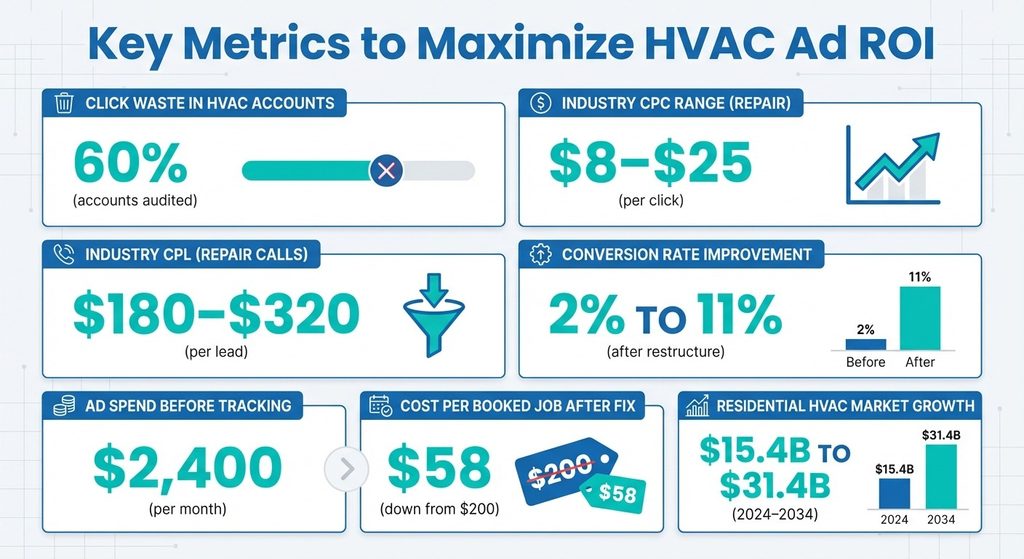
This wasn’t a Google conspiracy. It was a structural problem I see in roughly 60% of the accounts I audit for local trades: campaigns optimized for the wrong outcome, no mechanism to connect ad clicks to phone calls, and leadership making budget decisions in the dark. The residential HVAC market is projected to nearly double from $15.4 billion in 2024 to $31.4 billion by 2034, which means more competition for the same emergency repair searches.
If your paid search setup can’t prove it’s working, you’re not just wasting money—you’re losing ground to competitors who’ve figured out how to track what matters.
The Three Myths Keeping Your Phone Quiet
Myth One: Google Ads “Maximizes” What You Actually Need
When you select “maximize clicks” as your bidding strategy, Google’s algorithm does exactly what you asked—it finds the cheapest clicks available within your budget. For air conditioning companies, that often means clicks from people researching central air costs for a house they might buy next year, or homeowners comparing brands with no immediate need.
You’re paying for curiosity, not urgency.
What you actually need is “maximize conversions” or manual CPC bidding focused on high-intent keywords like “AC repair near me” or “emergency air conditioning service.”
Myth Two: Form Fills Equal Leads
I’ve reviewed accounts where 40% of form submissions were spam, duplicates, or people asking whether the company services a county three hours away. Without call tracking that assigns unique phone numbers to your campaigns, you’re blind to the channel driving actual service calls.
Most AC emergencies don’t start with a form—they start with a panicked homeowner dialing the first number they see on mobile search results at 9 PM on a Saturday.
Myth Three: Higher Budgets Solve Performance Problems
Google’s automated recommendations love suggesting you increase daily spend, but if your campaign structure is broken—wrong match types, no negative keywords, landing pages that don’t load on mobile—more budget just amplifies the waste. I’ve seen conversion rates jump from 2% to 11% after restructuring campaigns and adding call tracking, with the same monthly spend.
The issue isn’t budget size; it’s whether your dollars are chasing the right searches.
The Framework That Makes Paid Search Trackable
Here’s what changes when you treat paid search as a measurable system: you build campaigns around service intent, not service categories.
Most HVAC companies dump everything—installation, repair, maintenance, duct cleaning—into one campaign with broad match keywords. That setup forces Google’s algorithm to guess which searches matter most, and it guesses wrong.
The framework I walk clients through separates campaigns by commercial intent and seasonality. Emergency repair searches (“AC not cooling,” “air conditioner stopped working”) convert at a completely different rate than installation searches (“cost to replace central air”), and they deserve separate budgets, ad copy, and landing pages. When a homeowner’s AC dies on a 95-degree afternoon, they’re not comparison shopping—they need a truck today.
Your ad should speak to that urgency, your landing page should feature your phone number above the fold, and your bid should reflect the lifetime value of a customer who might need a full system replacement in three years.
Installation searches attract homeowners in research mode. They’re price-sensitive, comparing three to five companies, and the sales cycle stretches across weeks. These campaigns need different ad extensions (customer reviews, financing options), lower cost-per-click targets, and landing pages with estimate calculators or service area maps.
Call tracking is the connective tissue that makes this framework work. When you assign dynamic phone numbers to each campaign, your dashboard shows which searches generated actual phone calls, how long those calls lasted, and whether they booked appointments. I’ve had clients discover that their highest-cost keywords—terms like “best HVAC company”—drove plenty of clicks but almost zero calls longer than 30 seconds.
Call tracking lets you kill those budget drains and double down on the terms that ring your phone with real service requests.
Conversion rate becomes a diagnostic tool, not a vanity metric. If your “AC repair” campaign converts at 8% but your “AC installation” campaign converts at 1.5%, you’re learning that installation buyers need more nurturing, maybe a follow-up email sequence or a callback offer.
When I see conversion rates below 3% on emergency repair campaigns, it’s almost always a landing page problem—slow load time, buried phone number, or a form asking for too much information.
Building Campaigns That Answer “Is This Working?”
| Campaign Type | Primary Keywords | Expected Conversion Rate | Budget Allocation |
|---|---|---|---|
| Emergency Repair | “AC repair [city]”, “air conditioner not working”, “emergency HVAC near me” | 6-10% | 40-50% |
| Scheduled Service | “AC maintenance near me”, “air conditioning service”, “HVAC checkup” | 4-7% | 15-20% |
| Installation/Replacement | “central air installation cost”, “replace AC unit”, “new air conditioner” | 1.5-3% | 30-35% |
Step One: Keyword Structure That Mirrors Real Search Behavior
Start with three campaign types: emergency repair, scheduled service, and installation/replacement. Emergency repair keywords include exact and phrase match terms like “AC repair [city name],” “air conditioner not working,” and “emergency HVAC service near me.” These searches spike during heat waves, so your budget needs seasonal flex—higher daily caps from May through September, lower in shoulder months.
Scheduled service campaigns target maintenance and tune-up searches: “AC maintenance near me,” “air conditioning service,” “HVAC checkup.” These convert at moderate rates but attract customers who value preventive care, which often means higher lifetime value.
Installation campaigns focus on “central air installation cost,” “replace AC unit,” and “new air conditioner [city].” Expect longer sales cycles here, and structure your ads to offer free estimates or financing details upfront.
Step Two: Ad Copy That Directly Addresses the Searcher’s Situation
For emergency repair, your headline should confirm availability—”24/7 AC Repair in [City]” or “Same-Day Air Conditioning Service.” The description line needs to remove friction: “Call Now—Trucks Ready” or “No Overtime Charges.”
For installation, lead with transparency: “Free In-Home Estimate” or “Financing Available—0% APR.”
Generic ad copy that could apply to any HVAC service forces the searcher to click through just to figure out if you handle their specific need. That burns budget and lowers your Quality Score.
Step Three: Landing Page Alignment
If your ad promises same-day AC repair, the landing page can’t be your homepage with a navigation menu and a blog feed. It needs one clear path: phone number in the header, service area confirmation, and a short form (name, phone, zip code—nothing more).
I’ve tested landing pages with estimate calculators for installation campaigns, and they consistently improve conversion rates by giving the visitor something interactive to do while deciding whether to call.
Step Four: Call Tracking Setup (Non-Negotiable)
Services like CallRail or CallTrackingMetrics assign unique phone numbers to each campaign, so when a call comes in, you see the exact keyword that triggered it, the ad they clicked, and the landing page they visited. You can set up call recording to review whether your team is booking appointments or losing leads at the phone stage.
I’ve had clients discover their after-hours voicemail was costing them 15-20 calls per month because it didn’t offer an emergency callback option.
Step Five: Negative Keywords That Stop Waste
Add terms like “DIY,” “how to fix,” “YouTube,” “jobs,” and “salary” to your negative keyword list immediately. If you don’t service commercial buildings, add “commercial” and “industrial.” If you don’t offer specific brands, add those brand names.
I once audited an account spending $400/month on clicks for “Carrier AC parts”—the company didn’t sell parts, just service.
What You’re Actually Paying For (And What It Should Cost)
Cost per click (CPC) for air conditioning keywords varies wildly by market, but in mid-sized metros, expect $8-$25 for emergency repair terms and $4-$12 for installation terms. Competitive markets like Phoenix, Las Vegas, or Houston can push CPCs above $30 for top-of-page placement on “AC repair near me” during peak season.
Cost per lead (CPL) is the metric that actually matters, and it depends entirely on your conversion rate. If you’re paying $15 per click and converting at 6%, your CPL is $250. If you’re converting at 2%, it’s $750. For context, industry benchmarks show that service businesses typically see paid lead costs between $150-$400 depending on complexity and competition.
HVAC sits in the middle of that range when campaigns are structured correctly—I see healthy accounts running $180-$320 per lead for repair calls and $400-$650 for installation leads.
Return on ad spend (ROAS) connects marketing cost to business outcomes. If your average repair ticket is $450 and your CPL is $250, you’re making $200 gross profit per lead (assuming 100% close rate, which is optimistic). More realistically, if you close 60% of repair leads, your effective cost per job is $417, which means you’re breaking even or losing money on first-time repairs.
This is why lifetime customer value matters—that repair customer who comes back for annual maintenance and eventually replaces their system is worth $3,000-$8,000 over five years.
Budget allocation should follow intent and margin. If emergency repairs have thin margins but high volume, allocate 40-50% of your budget there to keep the phone ringing and build your customer base. Installation campaigns might get 30-35% because the payoff per conversion is higher even though volume is lower.
The Cost Trap to Watch
Google’s “automated bidding” can spiral if you don’t set maximum CPC caps. I’ve seen accounts where Google bid $47 for a single click on “emergency AC repair” because the algorithm decided that keyword was valuable and the account had no guardrails.
Set portfolio bid strategies with target CPA (cost per acquisition) limits, or use manual CPC with max bid caps until you have enough conversion data for Google’s machine learning to optimize responsibly.
Google Ads vs. Microsoft Advertising: The Platform Question
Most HVAC companies default to Google Ads because that’s where search volume lives—Google owns roughly 90% of search traffic. But Microsoft Advertising (formerly Bing Ads) deserves a look, especially if you’re in markets with older homeowners or higher household incomes. Bing’s user base skews older and more affluent, which can mean higher-value installation leads and better conversion rates on financing offers.
The practical difference: Microsoft Advertising typically delivers 10-15% of the click volume you’d see on Google, but at 30-40% lower cost per click. If you’re spending $3,000/month on Google Ads, testing $500-$800 on Microsoft often returns 60-80 leads at a lower CPL.
The platform interface is nearly identical to Google Ads, and you can import your Google campaigns directly. I recommend running both platforms for 60 days, tracking calls separately, and comparing cost per booked job—not just cost per click.
One advantage Microsoft has: less competition on local service terms. When I search “AC repair near me” on Bing in mid-sized markets, I often see only two or three paid ads compared to four on Google. That means lower auction pressure and better ad positions at lower bids.
When the Phone Isn’t Ringing: The Diagnostic Checklist
If you’re spending $1,500+ per month and not seeing consistent call volume, here’s the troubleshooting sequence I walk through on audits.
First, check your campaign settings: Are you set to “maximize clicks” instead of “maximize conversions”? Is your location targeting set to “people in or regularly in” your service area, or is it bleeding into “people interested in” your area (which includes tourists and people researching moves)?
Second, review your search terms report. This shows the actual queries triggering your ads, and it’s where you’ll find the waste. If you see terms like “AC repair cost,” “how much does AC repair cost,” or “average price for AC repair,” those are research clicks, not service calls. Add them as negative keywords.
Third, test your landing page on mobile. Pull out your phone, search for one of your keywords, click your ad, and see what loads. Does the page take more than three seconds to appear? Is your phone number a clickable tap-to-call link in the header? Can you see it without scrolling?
Fourth, check your ad schedule and budget pacing. If your daily budget is $100 but Google burns through it by 2 PM, your ads aren’t showing during evening hours when homeowners get home and realize their AC isn’t working. Either increase your budget or use ad scheduling to focus spend on high-conversion hours (typically 7 AM-10 AM and 5 PM-9 PM for emergency services).
Fifth, listen to your call recordings if you have tracking set up. Are calls getting answered? Is your team asking for the appointment, or just providing information and hoping the caller books? I reviewed recordings for a client and found that 30% of calls ended with “give us a call back when you’re ready to schedule”—which almost never happens.
If you’ve checked all five and the phone still isn’t ringing, the issue might be market saturation or your offer. In hyper-competitive markets, you need a differentiator beyond “licensed and insured”—same-day service guarantees, financing with instant approval, or a specific service area focus.
What One Account Shift Actually Looked Like
I worked with a three-truck AC company in Tucson last summer. They’d been running Google Ads for eight months, spending $2,400/month, and the owner was ready to kill the whole program. His dashboard showed 180 “conversions,” but when we pulled phone records and matched them to his CRM, only 22 actual service calls had come from ads.
The Three-Phase Rebuild
Phase one: We split emergency repair and installation into separate campaigns with different budgets—$1,600 for repair, $600 for installation, $200 for maintenance.
Phase two: We installed CallRail with dynamic number insertion so every campaign got its own tracking number.
Phase three: We rewrote ad copy to emphasize “Tucson Metro Only—Same-Day Service” and built a mobile-first landing page with a tap-to-call button and a 30-second form.
After 90 days, the numbers told a different story. Total spend stayed at $2,400, but tracked phone calls jumped to 67 (up from 22), and booked jobs hit 41. Cost per booked job dropped from an estimated $200 to $58.
The owner’s exact words: “I can actually see where my money’s going now, and I’m not afraid to spend more.”
They increased budget to $3,200 the next month and added Microsoft Advertising at $600. The shift wasn’t magic—it was structure, tracking, and aligning spend with actual service demand.
Your Next 30 Days
If you’re running paid search now and it feels like you’re flying blind, here’s the 30-day plan that gets you to measurable:
- Week one: Install call tracking and connect it to your existing campaigns
- Week two: Audit your search terms report and add 20-30 negative keywords
- Week three: Split your campaigns by service type (repair vs. installation minimum) and adjust budgets to match your margin and capacity
- Week four: Rebuild your primary landing page for mobile with one goal—get the phone to ring
If you’re not running paid search yet and you’re trying to decide whether it’s worth it, start with a 60-day test at $1,500-$2,000/month focused exclusively on emergency repair in your tightest service area. Set up call tracking from day one, track cost per call and cost per booked job, and compare that to what you’re paying for other lead sources.
Paid search won’t be your cheapest lead source, but it might be your most controllable—and in a business where summer heat waves create demand spikes you can’t predict, having a channel you can scale up or down in 24 hours is worth the learning curve.
The question isn’t whether Google Ads for HVAC works—it’s whether you’ve built the infrastructure to prove it’s working and make decisions based on real data instead of dashboard guesses.